
Testing Flutter Apps

BLOG
X
min read

Flutter application testing is a complex process: dozens of screen resolutions, several versions of operating systems, all kinds of connection types, etc. But you just can’t hope for a successful mobile app release without it.

Flutter automated testing empowers you to accomplish higher acceptance in your application since it helps you to discover bugs in your application.

In this blog, we will explore Integration testing with flutter using flutter drive. We will implement a demo of integration testing for our flutter application and why do we need test cases for our application?

Flutter Testing

The more features your application has the harder it is to test manually. Automated tests help guarantee that your application performs accurately before you publish it.

Flutter is an open-source UI software development kit created by Google. It is used to develop cross-platform applications for Android, iOS, Linux, Mac, Windows, Google Fuchsia, and the web from a single codebase.

Flutter Testing Falls into Three Categories:

• Unit Testing.

• Widget Testing.

• Integration Testing
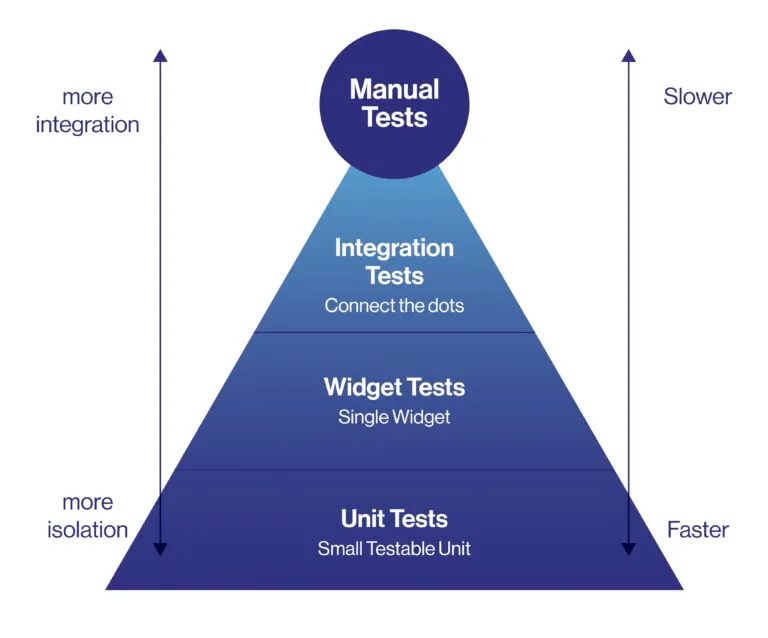
Note: In this blog, we will discuss only Integration Testing.

Why Test Cases?

We write test cases for our applications to verify a particular feature or functionality. A test case contains test steps, test data, precondition, postcondition developed for specific test scenarios to verify any requirement. We try as much as we can to detect the major bugs before publishing them on the store. To ensure that we’ve covered all possible scenarios, we need to start out by creating our test cases.

Real device testing helps to guarantee an in-depth analysis of functionality. Testing on real mobile devices always gives precise outcomes for the app and it can totally ensure that a given feature works on an appropriate gadget. It also facilitates a great user experience.

Why Integration Test?

Unit tests and widget tests are handy for testing individual classes, functions, or widgets. However, they generally don’t test how individual pieces work together as a whole or capture the performance of an application running on a real device. These tasks are performed with integration tests.

Integration tests work as a pair: first, deploy an instrumented application to a real device or emulator and then “drive” the application from a separate test suite, checking to make sure everything is correct along the way.

Note: Instrumentation is a process to prepare the application for testing or automation.

To create this test pair, use the “flutter_driver” package. It provides tools to create instrumented apps and drive those apps from a test suite.

Implementation:

Step 1: Create App to test

In this case, we will use MCI BO mobile app as an example app to apply our test.

Step 2: Add the dependencies

Add the flutter_driver dependency to pubspec.yaml file.

 dev_dependencies:
   flutter_launcher_icons: ^0.7.3
# flutter_test:
# sdk: flutter
 test: any
 flutter_test:
   sdk: flutter
 flutter_driver:
   sdk: flutter


Step 3: Create the test files

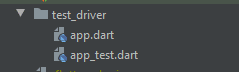
Unlike unit and widget tests, integration test suites do not run in the same process as the app being tested. Therefore, create two files that reside in the “main” project directory. By convention, the directory is named “test_driver”.

1. The first file contains an “instrumented” version of the app. The instrumentation allows you to “drive” the app and record performance profiles from a test suite. This file can have any name that makes sense. For this example, create a file called test_driver/app.dart.

2. The second file contains the test suite, which drives the app and verifies that it works as expected. The test suite also records performance profiles. The name of the test file must correspond to the name of the file that contains the instrumented app, with _test added at the end. Therefore, create a second file called test_driver/app_test.dart.
Step 4: Instrument the application

1. Enable the flutter driver extensions.

2. Run the app.

import 'package:flutter_driver/driver_extension.dart';
void main() async {
  enableFlutterDriverExtension();
  WidgetsFlutterBinding.ensureInitialized();
  if(Device.get().isTablet){
    SystemChrome.setPreferredOrientations([DeviceOrientation.landscapeLeft,DeviceOrientation.landscapeRight]);
  }else{
    SystemChrome.setPreferredOrientations([DeviceOrientation.portraitDown,DeviceOrientation.portraitUp]);
  }

  runApp(MyApp());
}


Step 5: Write the tests

Now that you have an instrumented app, you can write tests for it.

This involves four steps:

1. Create SerializableFinders to locate specific widgets.

2. Connect to the app before our tests run in the setUpAll() function.

3. Test the important scenarios.

4. Disconnect from the app in the teardownAll() function after the tests are complete.

 void main() {
  group('MCI Testing', () {
    //login screen
    final usernameTextFinder = find.byValueKey('username');
    final passwordTextFinder = find.byValueKey('password');
    final checkboxFinder = find.byValueKey('rememberMeCheckBox');
    final loginBtnFinder = find.byValueKey('loginButton');
    FlutterDriver driver;
    // Connect to the Flutter driver before running any tests.
    setUpAll(() async {
      driver = await FlutterDriver.connect();
    });

   // Close the connection to the driver after the tests have completed.
   tearDownAll(() async {
     if (driver != null) {
       driver.close();
     }
   });
   test('test login screen', () async {
     //insert username
     await driver.tap(usernameTextFinder);
     await driver.enterText("mawaziny@mci.gov");
    //insert password
     await driver.tap(passwordTextFinder);
     await driver.enterText("P@ssw0rd");
    //check the stay loggedin checkbox
     await driver.tap(checkboxFinder);
   //press login button
     await driver.tap(loginBtnFinder);
     await driver.waitFor(find.text("الرئيسية"));
     await driver.tap(find.text("المدير"));
     await driver.tap(find.text("الرئيسية"));
    });
 });


Step 6: Run the tests

To test on iOS or Android, launch an Android Emulator, iOS Simulator, or connect your computer to a real iOS / Android device.

Then, run the following command from the root of the project:

flutter drive --target=test_driver/app.dart

This command performs the following:

• Builds the --target app and installs it on the emulator/device.

• Launches the app.

• Runs the app_test.dart test suite located in test_driver/ folder.

Modernizing Legacy Apps​

Maecenas mollis sagittis ante, eleifend ultricies sapien. Nam ultricies risus et augue auctor vulputate gravida eget sem. Quisque mollis gravida magna, eu semper eros pharetra in. Sed et elit sit amet odio rutrum consectetur vel vel ante. Praesent vitae elementum lacus. Vivamus efficitur nunc tortor, cursus lobortis purus placerat ut. Maecenas ut aliquet ante, vel finibus lorem. Nulla facilisi. Donec maximus elementum pulvinar.

test heading

h1 text

h3

Impact

Sample article featured image
Pellentesque posuere sem in ipsum venenatis, at bibendum lorem aliquam. Nullam condimentum tempus orci nec commodo. Maecenas malesuada elementum metus, non aliquam est elementum sed. Integer ac finibus ligula, id venenatis lectus. Mauris non eleifend enim. Pellentesque eu congue justo. In ornare dapibus nisi, sit amet feugiat neque. Vivamus mollis, lectus quis gravida viverra, risus ligula congue felis, ut laoreet sem nisi in tortor. Sed vel ligula nulla.
“Quisque mollis purus nec pulvinar rutrum. Duis faucibus sed orci vel pellentesque. Interdum et malesuada fames ac ante ipsum primis in faucibus. Donec non volutpat eros, nec placerat mi. Praesent porta felis ut urna sagittis, sit amet placerat nisl porttitor.”

Nunc tempor molestie velit id dictum. Aenean ac venenatis ipsum, sit amet sodales tortor. Pellentesque habitant morbi tristique senectus et netus et malesuada fames ac turpis egestas. Pellentesque posuere sem in ipsum venenatis, at bibendum lorem aliquam.

Nullam condimentum tempus orci nec commodo. Maecenas malesuada elementum metus, non aliquam est elementum sed. Integer ac finibus ligula, id venenatis lectus. Mauris non eleifend enim. Pellentesque eu congue justo. In ornare dapibus nisi, sit amet feugiat neque. Vivamus mollis, lectus quis gravida viverra, risus ligula congue felis, ut laoreet sem nisi in tortor. Sed vel ligula nulla.

data-acc-source-start

Ensure that Modernizing your Legacy Application is the Right Decision

Our expert consultants work closely with you to understand you organization's business drivers, then conduct an in-depth business goals and that every dollar invested is directed towards the right solution

Depend on a Tailored, Phased Application Modernization Strategy

Our expert consultants work closely with you to understand you organization's business drivers, then conduct an in-depth business goals and that every dollar invested is directed towards the right solution

Streamline the Transition from Old to New

Our expert consultants work closely with you to understand you organization's business drivers, then conduct an in-depth business goals and that every dollar invested is directed towards the right solution

data-acc-source-end

Lorem ipsum dolor sit amet, consectetur adipiscing elit. Curabitur elementum, elit a pellentesque placerat, nisl quam blandit orci, at maximus eros nunc nec lacus. Nullam euismod consequat libero, eget suscipit ligula lacinia nec. Nunc finibus dapibus quam, eu convallis magna. Nulla finibus ut risus in sodales. Cras tristique nisi non mattis volutpat. Nullam venenatis varius nisl, dictum ornare lorem dictum rhoncus. Nulla sem nunc, lobortis et massa sed, ultrices convallis justo. Quisque laoreet nibh sit amet arcu rhoncus accumsan. Proin at elementum lacus, at maximus mi. Curabitur vulputate urna mollis lacinia auctor. Donec venenatis finibus magna id tempor. Duis at mattis odio. Aenean eu tempus justo. Donec est arcu, vulputate quis risus et, pharetra imperdiet velit.

Vivamus ut dignissim quam.

No items found.
Article carousel image 1
Article carousel image 2
Article carousel image 3
Author
Yomna Anwar
Posted on
13 Oct 2021
We’re your partner in addressing

real human needs.

Align IT Initiatives with Strategic Business Goals
Plus sign iconMinus sign icon
10X
Increase in transactions
per second

Heading 1

Heading 2

Heading 3

Heading 4

Heading 5
Heading 6

Lorem ipsum dolor sit amet, consectetur adipiscing elit, sed do eiusmod tempor incididunt ut labore et dolore magna aliqua. Ut enim ad minim veniam, quis nostrud exercitation ullamco laboris nisi ut aliquip ex ea commodo consequat. Duis aute irure dolor in reprehenderit in voluptate velit esse cillum dolore eu fugiat nulla pariatur.

Block quote

Ordered list

  1. Item 1
  2. Item 2
  3. Item 3

Unordered list

  • Item A
  • Item B
  • Item C

Text link

Bold text

Emphasis

Superscript

Subscript

Modernizing Legacy Apps​

Maecenas mollis sagittis ante, eleifend ultricies sapien. Nam ultricies risus et augue auctor vulputate gravida eget sem. Quisque mollis gravida magna, eu semper eros pharetra in. Sed et elit sit amet odio rutrum consectetur vel vel ante. Praesent vitae elementum lacus. Vivamus efficitur nunc tortor, cursus lobortis purus placerat ut. Maecenas ut aliquet ante, vel finibus lorem. Nulla facilisi. Donec maximus elementum pulvinar.

Impact

Sample article featured image
Pellentesque posuere sem in ipsum venenatis, at bibendum lorem aliquam. Nullam condimentum tempus orci nec commodo. Maecenas malesuada elementum metus, non aliquam est elementum sed. Integer ac finibus ligula, id venenatis lectus. Mauris non eleifend enim. Pellentesque eu congue justo. In ornare dapibus nisi, sit amet feugiat neque. Vivamus mollis, lectus quis gravida viverra, risus ligula congue felis, ut laoreet sem nisi in tortor. Sed vel ligula nulla.
“Quisque mollis purus nec pulvinar rutrum. Duis faucibus sed orci vel pellentesque. Interdum et malesuada fames ac ante ipsum primis in faucibus. Donec non volutpat eros, nec placerat mi. Praesent porta felis ut urna sagittis, sit amet placerat nisl porttitor.”

Nunc tempor molestie velit id dictum. Aenean ac venenatis ipsum, sit amet sodales tortor. Pellentesque habitant morbi tristique senectus et netus et malesuada fames ac turpis egestas. Pellentesque posuere sem in ipsum venenatis, at bibendum lorem aliquam.

Nullam condimentum tempus orci nec commodo. Maecenas malesuada elementum metus, non aliquam est elementum sed. Integer ac finibus ligula, id venenatis lectus. Mauris non eleifend enim. Pellentesque eu congue justo. In ornare dapibus nisi, sit amet feugiat neque. Vivamus mollis, lectus quis gravida viverra, risus ligula congue felis, ut laoreet sem nisi in tortor. Sed vel ligula nulla.

data-acc-source-start

Ensure that Modernizing your Legacy Application is the Right Decision

Our expert consultants work closely with you to understand you organization's business drivers, then conduct an in-depth business goals and that every dollar invested is directed towards the right solution

Depend on a Tailored, Phased Application Modernization Strategy

Our expert consultants work closely with you to understand you organization's business drivers, then conduct an in-depth business goals and that every dollar invested is directed towards the right solution

Streamline the Transition from Old to New

Our expert consultants work closely with you to understand you organization's business drivers, then conduct an in-depth business goals and that every dollar invested is directed towards the right solution

data-acc-source-end

Lorem ipsum dolor sit amet, consectetur adipiscing elit. Curabitur elementum, elit a pellentesque placerat, nisl quam blandit orci, at maximus eros nunc nec lacus. Nullam euismod consequat libero, eget suscipit ligula lacinia nec. Nunc finibus dapibus quam, eu convallis magna. Nulla finibus ut risus in sodales. Cras tristique nisi non mattis volutpat. Nullam venenatis varius nisl, dictum ornare lorem dictum rhoncus. Nulla sem nunc, lobortis et massa sed, ultrices convallis justo. Quisque laoreet nibh sit amet arcu rhoncus accumsan. Proin at elementum lacus, at maximus mi. Curabitur vulputate urna mollis lacinia auctor. Donec venenatis finibus magna id tempor. Duis at mattis odio. Aenean eu tempus justo. Donec est arcu, vulputate quis risus et, pharetra imperdiet velit.

Vivamus ut dignissim quam.

No items found.
Article carousel image 1
Article carousel image 2
Article carousel image 3
Author
This is some text inside of a div block.
Posted on
This is some text inside of a div block.
Topics